Everything New on Onton (May 2026)
product
If you’ve opened Onton lately, you might have noticed things feel a little different. We’ve been quietly refreshing the product, so if everything feels faster and smoother, you’re not wrong.
The upgrades we’re shipping are aimed at one thing: a better online shopping experience for your home. Inspiration not landing? We’re making it easier to find. Struggling to visualize your space? We’ve upgraded that too.
A completely new homepage
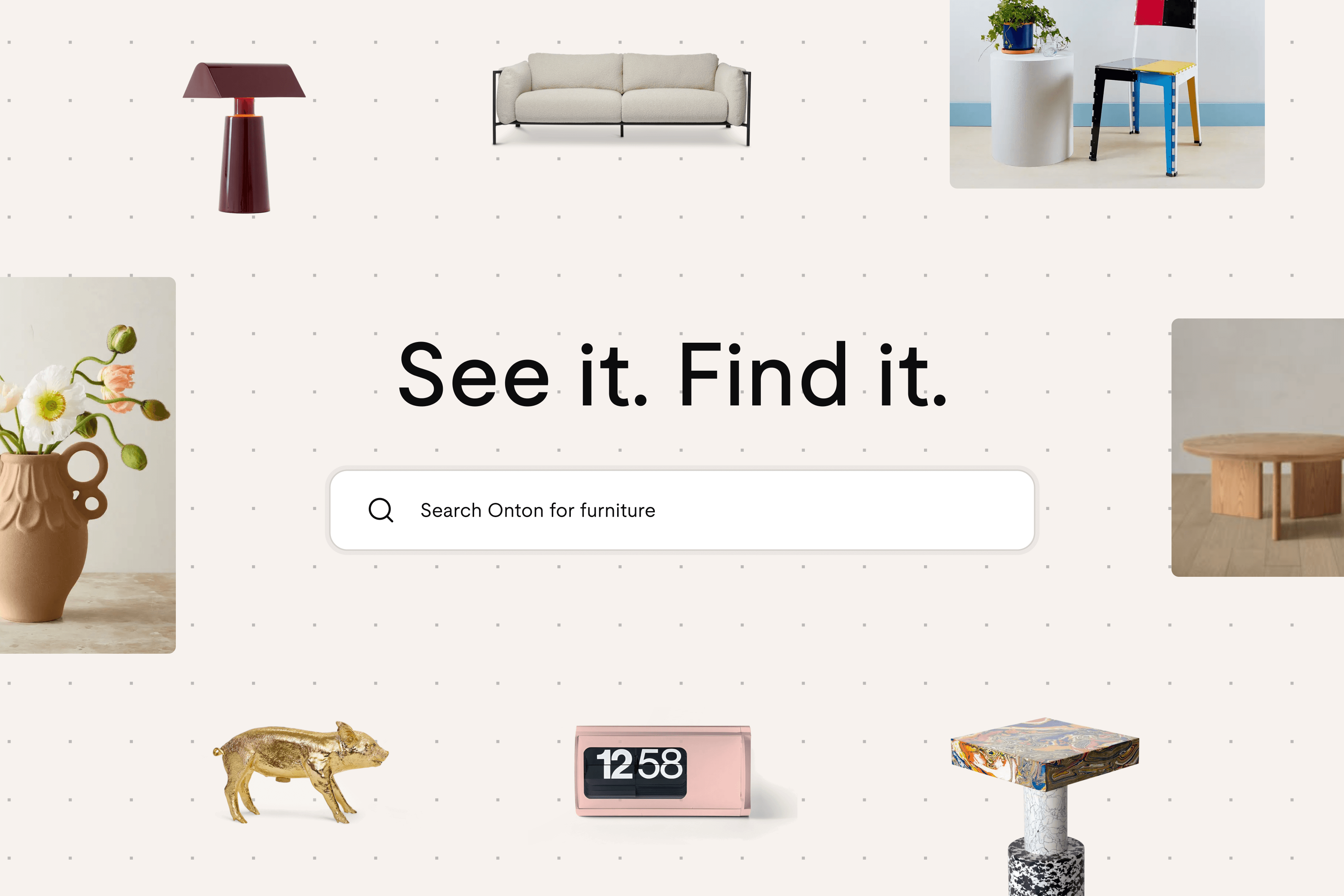
Your home starts at the homepage. First impressions matter. So we gave our homepage a glow up. The goal is to pull you into the Onton experience from the moment you land.
Drag a floating image into the search bar and watch search do its magic. Not sure what to type? Open the Discover feed and browse for inspiration. We're building the antithesis of a dead-end shopping experience.
Like what you see? Stay for a while. We’re making the logged-in experience feel more like yours.
Our new logged-in homepage is the ultimate workspace for the everyday online shopper.
The Surfaces tab keeps every project in one place: Lists you can use as a wishlist or shortlist (did you know each list includes chat so you can ask product questions before you buy?) and Canvas, the infinite board for products, images, visualization, research, creation, whatever you would use a blank canvas for. So you can jump between projects without ever leaving Onton.
Right underneath, there’s a long, shoppable strip of product cards so you can keep browsing without feeling like you hit a wall. Get lost in a beautiful feed for a minute and let it kickstart your next search or save.
Try it: Open up onton.com and take a look around.
A redesigned Imagine
We recently shipped two big improvements to Onton Imagine: an upgraded image generation model and a redesigned experience. The new version is faster and more intuitive, so it's easier to spin up room inspiration and iterate. Generations feel sharper overall with stronger prompt adherence, more spatial and structural accuracy, and better product rendering and design choices.
We also made the next steps obvious: take what you make and add it to Canvas, or shop from products in the image, without losing the thread.
Try it: onton.com/imagine
Search with filters
Discovery only helps if you can get specific when you’re ready. We introduced filters to make it easy to tighten results down to price range and brand.
Try it: Run a search, then open filters, and watch the grid respond.
Save to Canvas
Canvas is Onton’s visual workspace. An infinite Canvas for products, inspiration, Remix (AI room images), and shopping directly from your board without ever leaving. Before, you could only save products to a list. Now, with Save to Canvas, you can grab something you love and drop it straight onto a board you’re already building.
Try it: Search for a product, save it to a Canvas, and open your board to see it there.
See it. Shop it.
Shopping for your home is an inherently visual process, but writing a description into a search box isn’t always the most intuitive. We built in object detection that matches items in a photo to real products in Onton’s catalog, so you can go from “that lamp in the corner” to something you can actually buy. Upload any image and see what we surface.
Try it: onton.com/imagine
What’s next
We’re always shipping. Follow onton.com and our social channels for what’s live next!
If you’ve opened Onton lately, you might have noticed things feel a little different. We’ve been quietly refreshing the product, so if everything feels faster and smoother, you’re not wrong.
The upgrades we’re shipping are aimed at one thing: a better online shopping experience for your home. Inspiration not landing? We’re making it easier to find. Struggling to visualize your space? We’ve upgraded that too.
A completely new homepage
Your home starts at the homepage. First impressions matter. So we gave our homepage a glow up. The goal is to pull you into the Onton experience from the moment you land.
Drag a floating image into the search bar and watch search do its magic. Not sure what to type? Open the Discover feed and browse for inspiration. We're building the antithesis of a dead-end shopping experience.
Like what you see? Stay for a while. We’re making the logged-in experience feel more like yours.
Our new logged-in homepage is the ultimate workspace for the everyday online shopper.
The Surfaces tab keeps every project in one place: Lists you can use as a wishlist or shortlist (did you know each list includes chat so you can ask product questions before you buy?) and Canvas, the infinite board for products, images, visualization, research, creation, whatever you would use a blank canvas for. So you can jump between projects without ever leaving Onton.
Right underneath, there’s a long, shoppable strip of product cards so you can keep browsing without feeling like you hit a wall. Get lost in a beautiful feed for a minute and let it kickstart your next search or save.
Try it: Open up onton.com and take a look around.
A redesigned Imagine
We recently shipped two big improvements to Onton Imagine: an upgraded image generation model and a redesigned experience. The new version is faster and more intuitive, so it's easier to spin up room inspiration and iterate. Generations feel sharper overall with stronger prompt adherence, more spatial and structural accuracy, and better product rendering and design choices.
We also made the next steps obvious: take what you make and add it to Canvas, or shop from products in the image, without losing the thread.
Try it: onton.com/imagine
Search with filters
Discovery only helps if you can get specific when you’re ready. We introduced filters to make it easy to tighten results down to price range and brand.
Try it: Run a search, then open filters, and watch the grid respond.
Save to Canvas
Canvas is Onton’s visual workspace. An infinite Canvas for products, inspiration, Remix (AI room images), and shopping directly from your board without ever leaving. Before, you could only save products to a list. Now, with Save to Canvas, you can grab something you love and drop it straight onto a board you’re already building.
Try it: Search for a product, save it to a Canvas, and open your board to see it there.
See it. Shop it.
Shopping for your home is an inherently visual process, but writing a description into a search box isn’t always the most intuitive. We built in object detection that matches items in a photo to real products in Onton’s catalog, so you can go from “that lamp in the corner” to something you can actually buy. Upload any image and see what we surface.
Try it: onton.com/imagine
What’s next
We’re always shipping. Follow onton.com and our social channels for what’s live next!
Everything New on Onton (May 2026)
product