•
Onton Team
There is a lot of skepticism around AI in interior design. AI shows a dreamy room full of imaginary furniture and in dimensions that aren’t reflective of your space. AI comes across as just fun and games instead of providing any tangible solution to your furniture shopping problems. But AI isn’t meant to replace your taste or personal style. It’s meant to assist you and make the process easier.
The worst part of shopping for furniture online is digging through an overwhelming volume of products while trying to figure out which ones fit your style, have the right dimensions, and stay within your budget. And before you know it, you are 20 tabs deep, building a spreadsheet, and reading pages of Reddit threads just to work out what you actually need.
AI is great at helping you define your style, find matching products from an image, organize your options, and do the product research. It massively accelerates a process that is currently time-consuming and tedious, draining all the fun out of retail therapy.
Here is the exact workflow you’ll use to capitalize on AI’s capabilities and speed up your furniture shopping journey. With these steps, your creative ideas will have the most capacity to flourish.
Why AI usually disappoints
Most people will try AI once, whether it’s using an image generation tool or asking ChatGPT for product recommendations, and find that the output isn’t quite what they were looking for. AI generation outputs hallucinated details, while ChatGPT often suggests sponsored or manipulated results. Either way, it feels like AI can never hit the mark.
But to understand how to leverage AI, it’s also important to understand the steps of online furniture shopping first. And it generally looks something like: figure out the look you want, find the pieces that fit, collect all your options, compare them, visualize how to put them together, and buy. AI can help with all of those steps. But a tool that’s excellent at one of those steps, doesn’t get you any closer to making a purchase. In this guide, we’ll walk you through how to use AI for all of those steps, in the simplest, most frictionless way possible.
The ultimate AI furniture shopping workflow
Get the look
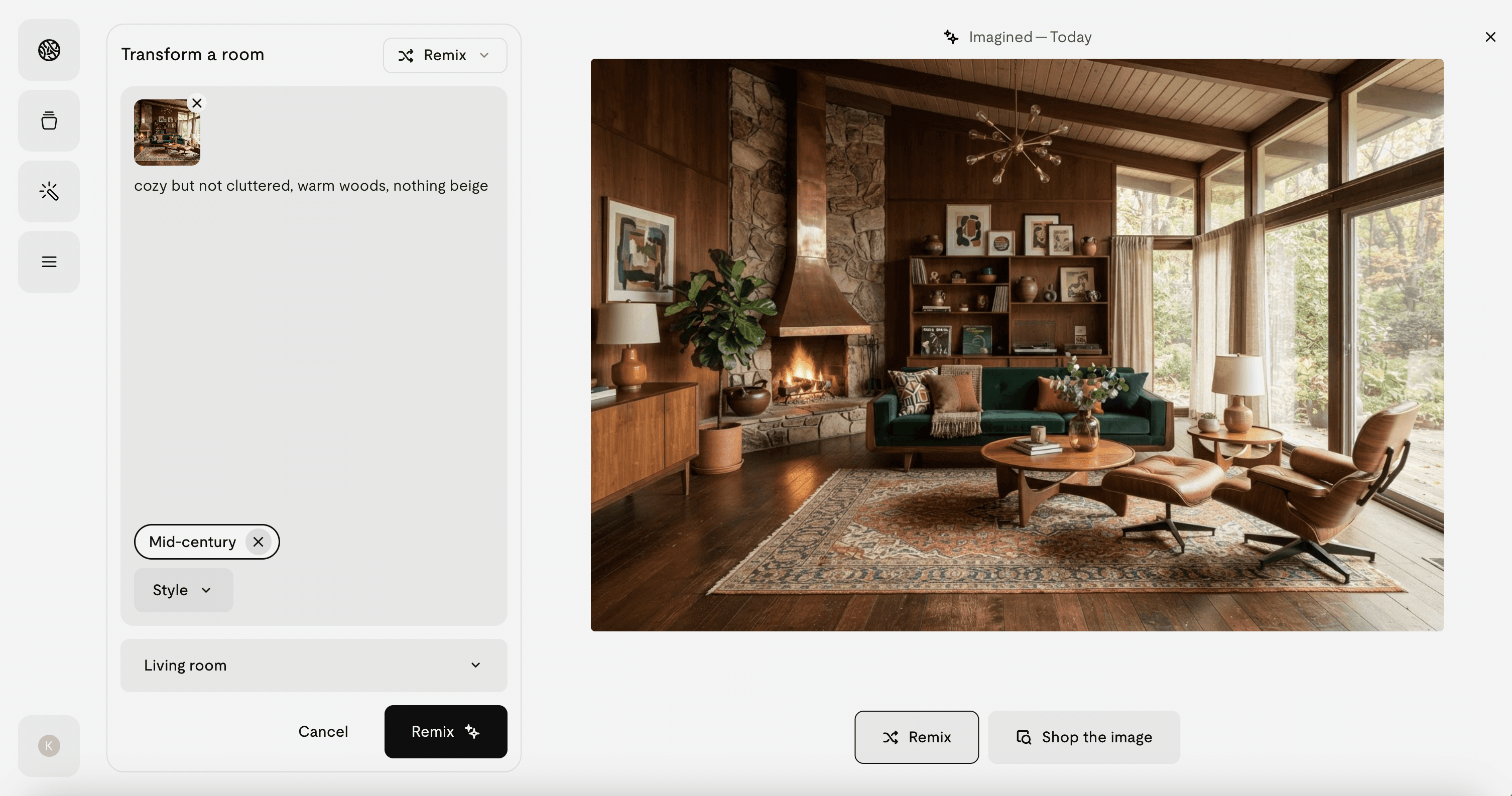
The first and foremost step is always to ask yourself, 'What do I actually want?" This is a question that AI can actually help with. Go to Onton Imagine and upload a photo of your space. Describe what you're going for in plain language, e.g. cozy but not cluttered, warm woods, nothing beige. And finally, generate a few renders and see whether they match what you're picturing. You can adjust your prompt based on what comes back. There's also a dropdown of styles. Depending on what resonates, drop it in and see what the AI does with your space. Instead of guessing what furniture will suit your space, you can see it first and then decide.
Finding the product
The best part about Imagine is when a render has pieces you like, you can click “Shop the Image” and Onton identifies the items and finds matching products across our catalogue of 3M+ products from 200+ verified retailers.
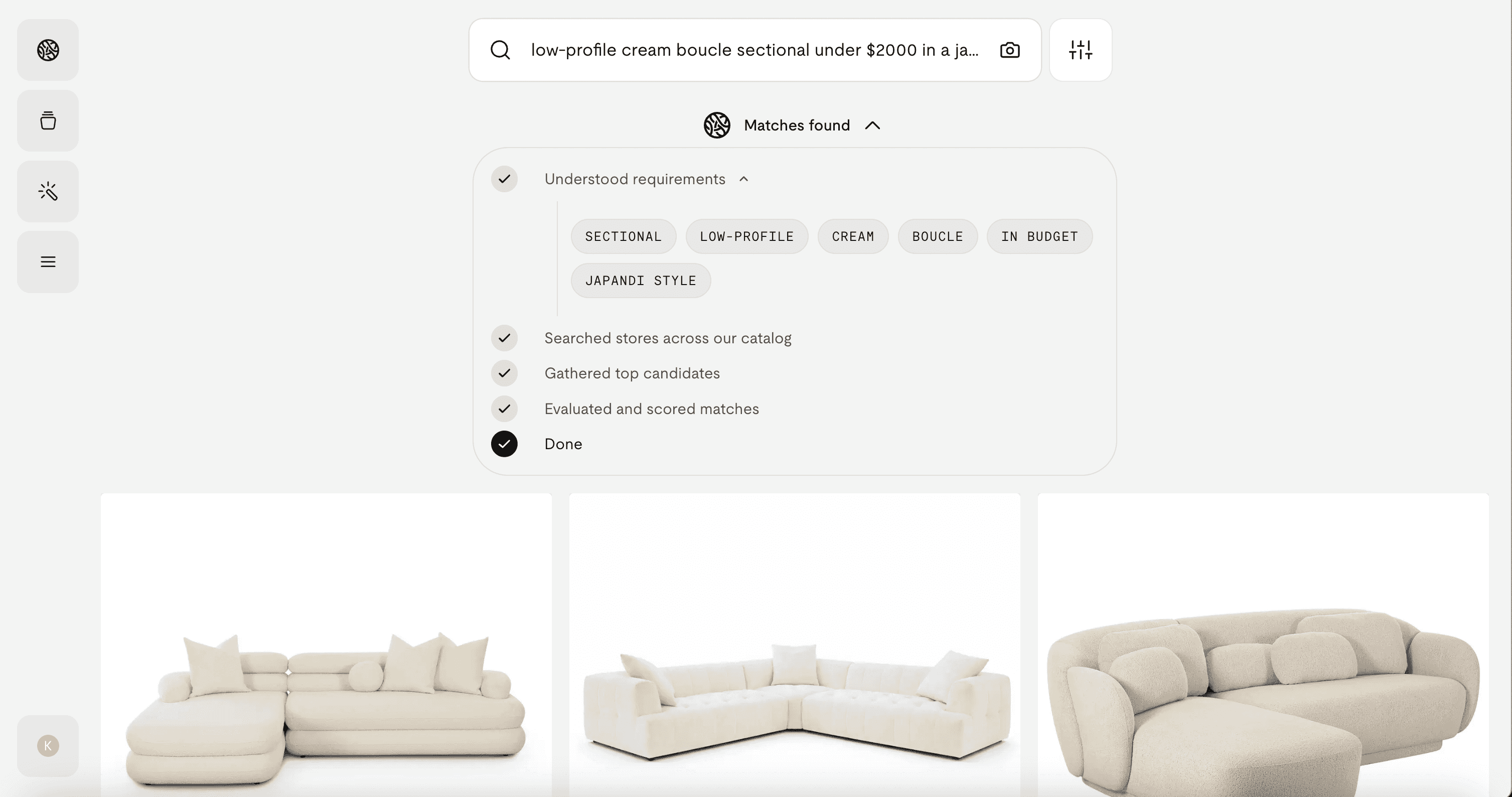
Otherwise, you can head to the search bar to look for products directly. Search is usually where furniture shopping gets the most frustrating. Search engines like Google or Bing are keyword-based and flooded with sponsored and pay-to-rank results. Seldom does it feel like the results are the best match. Onton's search, however, runs on a layer of neurosymbolic AI, delivering accurate results based on the attributes you describe. Search is currently powered by Ontology 1, our latest self-learning model that reasons over real product data, and gets sharper the more it's used.
It's also multimodal, so you can search with words, an image, or both, to steer your results several ways:
Search in plain English like how you'd describe it to a friend or shopping assistant, e.g. low-profile cream boucle sectional under $2000.
Add an image to add more context to your search. As a standalone image, you can either shop the specific items in the image, or the vibe of it. Paired with text, an image serves as a reference to better match your intent and increase search accuracy.
With crop to search, zero in on a single item in a photo and find the exact piece or the closest match.
Turn inspiration photos into real, shoppable products
Furniture shopping usually starts from a room: a screenshot from Instagram, a Pinterest pin, a hotel lobby, a magazine page. Upload that image to the search bar and "Shop the Image." Onton's object detection reads the whole room, identifies each piece, and matches them to real, shoppable products in its catalogue. Get started here.
And if you’re only after a single item in a photo, crop to it and search just that piece. For why generic reverse image search fails at this, see our breakdown.
Collect and organize your options
To avoid keeping 20 tabs open, put everything in one workspace. Think of it like a folder, but more visual and far more useful. Onton has Surfaces in two forms: Lists and Canvas.
Lists is self-explanatory. As you browse and find products you like, save them into lists, then organize and name those lists by room or project, whether that's a first dorm room or a laundry room refresh. They're shareable too for when you're deciding with a partner or client.
Canvas is a visual workspace, like a mood board, where you can drag in saved products, add your own inspiration images, and pull in AI room renders from Imagine. You can also search right from the board and add your Canvas to the search bar. Onton will grab products that fit its vibe, so you can keep finding inspiration without ever leaving your workflow. Powered by Ontology 1, it reads the attributes across your board and recommends products that match, so if your Canvas is trending toward wood and cottagecore, Onton recommends more of that same vibe. It's all bundled with editing tools and drag-and-drop that cut as much friction as possible while you shop and ideate.
Some fun Canvases to get you started.
Which AI tool for which job
Stage | Job | What to use | What to watch for |
Ideate | Figure out the look and palette for your space | Onton Imagine: upload a photo, describe the vibe in plain language, or pick from the style dropdown | Renders are a guide for the look, not a shopping list |
Find | Get real, in-budget products that match | Onton search, powered by Ontology 1: plain-language text, an image for vibe, or both | Most marketplace search is keyword-based and pay-to-rank, not the best match |
Capture | Turn an inspiration photo into shoppable products | Shop the Image: object detection reads the whole room; crop to zero in on one piece | Generic reverse image search fails at this |
Collect | Organize your options in one place | Surfaces: Lists to save and share, Canvas to build a mood board and search from it | 20 open tabs is not a system |
The whole workflow in one place
You can stitch this together across a chatbot, Pinterest, Google Lens, a marketplace, and a spreadsheet. But the reason the stages usually fall apart is the handoffs. The pieces you found don't carry into where you compare, and what you compared doesn't carry into where you visualize.
Running it on one platform removes the handoffs: search → find products from a photo → save to Lists → mood board on Canvas → preview in Imagine, all pointed at the same 3M+ catalog across 200+ retailers. Start at onton.com.
FAQ
How do I use AI to shop for furniture?
Use it across the whole process, not one step: describe your style to an AI and generate room visuals, search for real products in natural language, upload inspiration photos to find the exact pieces, save and organize options, compare finalists on verified data, and preview them in your room before buying.
What's the best AI tool for furniture shopping?
It depends on the stage. Conversational and image-generation AI are best for ideation; a shopping-first visual search engine is best for finding real, buyable products. Onton covers the full workflow — search (free, no ads), find-from-photo, Lists, Canvas, and Imagine — in one place.
Can AI find furniture from a photo of a whole room?
Yes, if the tool has object detection that reads the entire scene rather than one item. Upload the room photo and it identifies each piece and matches it to shoppable products.
What's the difference between adding an image to my search and "Shop the image"?
Adding an image steers your search by vibe or adds visual context to your words, so results match the mood you're after. "Shop the image" is object detection — it finds the actual products in the photo and matches each one. Use the first to explore a look, the second to buy what you see. You can also crop to a single item to search just that piece.
Is AI furniture search free?
Onton search is always free, and results are never ads or pay-to-rank. Some AI-powered tools (like heavier use of image generation) have free tiers with premium options for more usage.
How is this different from searching on a marketplace?
Marketplace search is largely keyword-based and pay-to-rank, so top results reflect ad spend. A self-learning model like Ontology reasons over real product data across many retailers and isn't influenced by who paid, so the best match surfaces first.
Can I see how furniture will look in my room before buying?
Yes. Take a photo of your room and use an AI staging tool such as Onton Imagine to preview pieces and styles in your actual space, then verify dimensions before you order.
Related reading
Keep reading
Design guides, smarter shopping, and AI-powered ways to find what you love
